Overview of Assessments
Accessing the Assessment Tool
Section titled “Accessing the Assessment Tool”- Open Jolly Classroom and go to your class dashboard
- Find the Assessments section
- Click Dashboard to open the Assessment Dashboard, or Start Assessment to begin one straight away
Assessment Dashboard
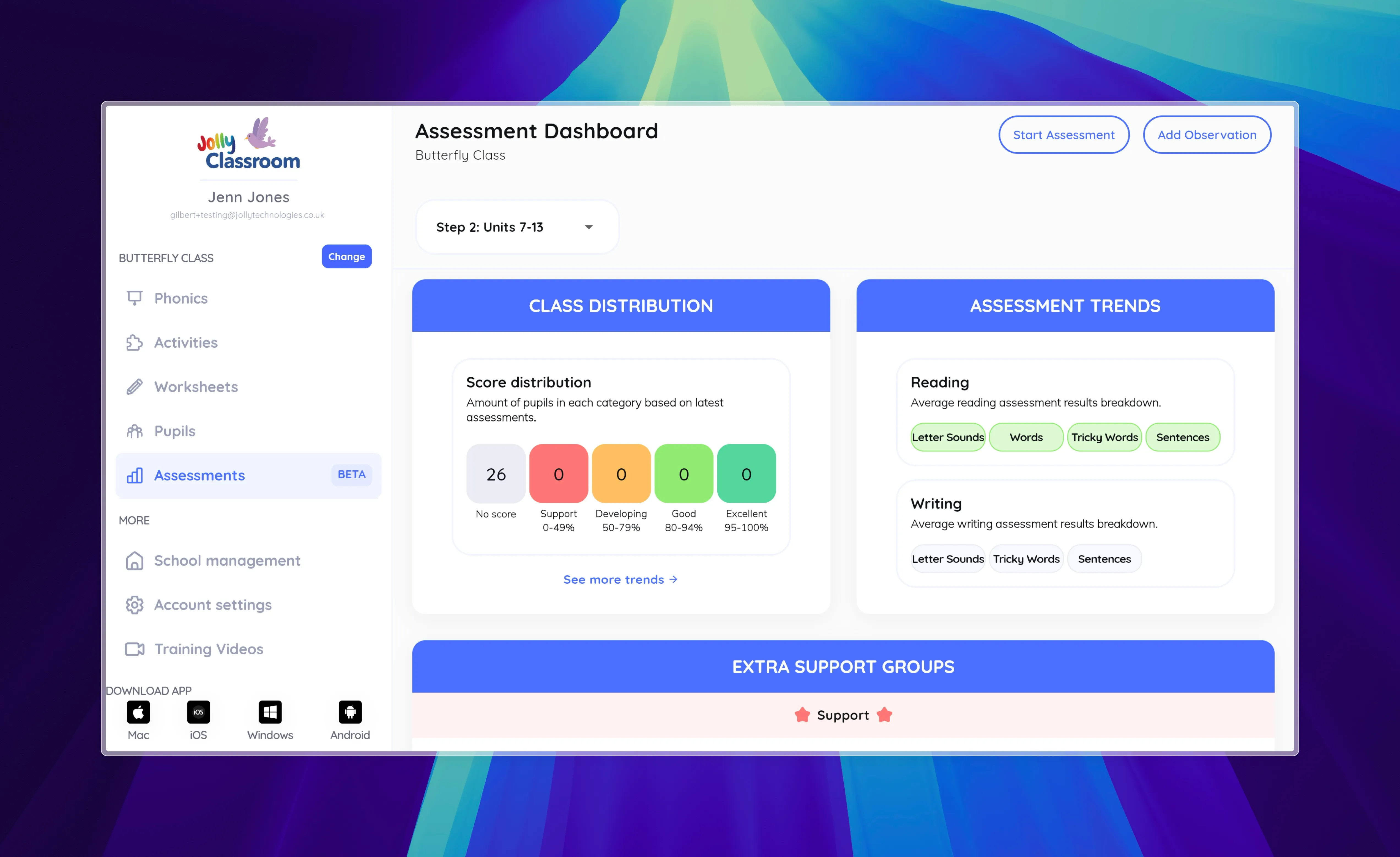
Section titled “Assessment Dashboard”The Assessment Dashboard provides an overview of all assessment activities and results.
Key Features:
Section titled “Key Features:”- Assessment Selection: Dropdown menu to choose different assessments
- Start Assessment Button: Quick access to begin a new assessment
- Class Overview: Summary of class performance across every sound (see Class Overview)
- Assessment Trends: Visual representation of class progress over time
- Extra Support Groups: Identification of students needing additional support
Dashboard Sections:
Section titled “Dashboard Sections:”- Overview Cards: Quick stats for current assessment performance
- Assessment Trends: Breakdown by Reading and Writing categories
- Categories Overview: Performance by skill area (Letter Sounds, Words, Tricky Words, Sentences)
- Historical Results: Previous assessment data with filtering options
Assessment Types
Section titled “Assessment Types”Reading Assessments
Section titled “Reading Assessments”- Purpose: Evaluate student reading skills and comprehension
- Format: Interactive session with teacher guidance
- Grading: Real-time scoring during assessment
- Features: Audio playback, sentence marking, error tracking
Writing Assessments
Section titled “Writing Assessments”- Purpose: Assess spelling and writing abilities
- Format: Teacher input of student results
- Grading: Manual entry with automated scoring
- Features: Teacher question preview, result import
Screening Assessments
Section titled “Screening Assessments”- Purpose: Run a Phonics Screening Check
- Format: Past screening checks you can work through with a pupil
- Availability: Shown on the Screening tab for phonics classes
Assessment Categories
Section titled “Assessment Categories”The assessment tool evaluates students across four main categories:
1. Letter Sounds
Section titled “1. Letter Sounds”- Focus: Phoneme recognition and pronunciation
- Grading: Binary (Correct/Incorrect)
- Assessment: Students identify letter sounds
2. Words
Section titled “2. Words”- Focus: Word reading and decoding skills
- Grading: Binary (Correct/Incorrect)
- Assessment: Students read individual words
3. Tricky Words
Section titled “3. Tricky Words”- Focus: Sight word recognition
- Grading: Binary (Correct/Incorrect)
- Assessment: Students read irregular words
4. Sentences
Section titled “4. Sentences”- Focus: Reading fluency and comprehension
- Grading: Scale-based (0-20 points based on errors)
- Assessment: Students read complete sentences
- Error Types:
- Reading errors
- Self-corrections
- Plausible spellings (writing only)